WhatsApp CRM for Salons: Stop Losing Regulars
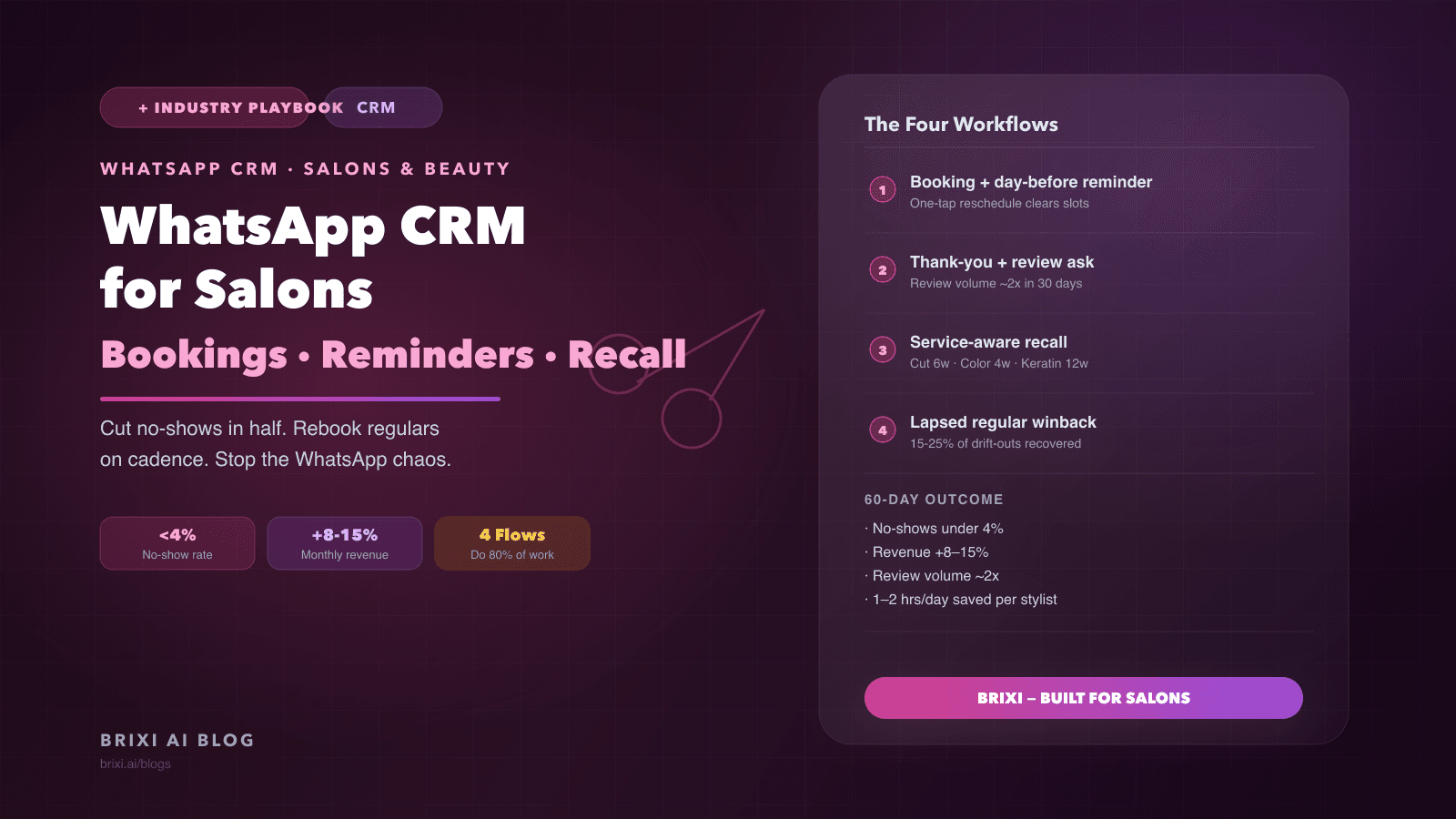
Every salon runs on WhatsApp, which is exactly why revenue leaks there. Bookings arrive in personal DMs, no-shows go uncontested, and regulars drift past their rebooking window before anyone notices. A WhatsApp CRM built for salons fixes all three without adding headcount, by making every conversation a data point and every lapse a trigger.
Janvi runs a six-stylist salon in Nashik. On a Tuesday in February she sat down with three months of booking records and counted 34 regulars who had not come back after their last appointment. She recognized almost every name. Each one had chatted on WhatsApp, liked the service, and said something like "see you next time." Not one of them got a next-time message. They drifted because nobody noticed they had drifted.
At an average ticket of 1,400 rupees and roughly two visits per quarter, those 34 regulars represent close to 95,000 rupees of quarterly revenue that left without a fight. Janvi did not lose them to a competitor with a better stylist. She lost them to friction: the regulars forgot, and her salon never reminded them.
This is the central problem with how salons manage WhatsApp today. The platform handles every part of the customer relationship: inquiries, confirmations, casual conversation, and re-engagement. But because messages live in the personal phones of individual stylists or in a single overloaded business number, there is no system tracking which regulars are overdue, which no-shows never rescheduled, and which first-time visitors never became regulars at all. A WhatsApp CRM built for salons is not a luxury add-on. It is the difference between a business that retains customers and one that slowly replaces them.
What Is the Cadence Debt Problem in Salon Retention?
Every salon service has a natural rebooking cadence. Root touch-ups return in four weeks. Haircuts in five to seven weeks. Keratin treatments in ten to fourteen weeks. Bridal prep is a fixed runway. When a salon does not track these intervals, it accumulates what I call Cadence Debt: regulars who are past due but invisible because no system is counting days since their last visit.
Cadence Debt is different from churn. Churned customers have decided to leave. Customers with Cadence Debt have not decided anything. They simply got busy, forgot, or assumed you would reach out. When you do reach out, at the right moment, a large fraction of them book within 48 hours. The challenge is knowing which regulars are in that window right now, and acting before the window closes.
Generic CRM tools and bulk WhatsApp senders fail here because they do not understand service types. They treat every customer as interchangeable and fire reminders on a flat calendar cadence: 30 days, 60 days, 90 days. A color customer reminded at 60 days has already been to a competitor. A keratin customer reminded at 30 days feels harassed. Cadence Debt can only be repaid with per-service recall windows, and that requires a salon-aware WhatsApp CRM.
Why Stylist Ownership Matters More Than You Think
In salons, the relationship is with the stylist as much as with the brand. Regulars book with a specific person. When a recall message comes from "the salon" instead of from "Priya, your usual stylist," the warmth drops and the booking rate drops with it. A salon WhatsApp CRM should model stylist ownership natively: each regular is assigned to a primary stylist, recall messages carry that stylist's name, and when a stylist is on leave, their conversations are covered by a colleague while the customer record stays intact.
The anti-pattern here is a single shared WhatsApp number where multiple stylists and the front desk reply from the same thread. Customers receive contradictory information about availability. Two people confirm the same slot to different customers. A regular's message sits unread for four hours because everyone assumed someone else would reply. A shared inbox without ownership rules is more chaotic than individual stylist phones, because at least personal phones have one person accountable.
Which Four Automations Do Most of the Revenue Work?
Four automations, deployed in order, handle approximately 80 percent of the predictable WhatsApp volume for a salon. None of them require a developer. All of them run on the official WhatsApp Business API.
Automation one: booking confirmation with stylist detail
The moment a slot is confirmed, the customer receives a message with the stylist name, service, date, and time. This single automation eliminates the most common source of booking disputes: the customer who arrives on the wrong day because "I thought it was Saturday, not Sunday." Confirmation messages also create a WhatsApp session that makes the reminder workflow cheaper to run because you are inside a 24-hour window.
Automation two: day-before reminder with one-tap reschedule
The evening before the appointment, a reminder goes out with the time, stylist, and a reschedule link. The critical element is the reschedule option. Customers who cannot make it but have an easy way to change the time will use it. Customers who cannot make it and have no easy option will simply not show up. Salons running day-before reminders with a reschedule link typically see no-show rates drop from a range of 8 to 12 percent to under 4 percent within two weeks. That freed capacity is often the most immediately visible revenue impact in the first month.
Automation three: post-service review and rebook prompt
Ninety minutes after an appointment ends, the customer receives a short thank-you and a Google review link. This timing matters. At 90 minutes the experience is fresh, the customer is not yet home and distracted, and the emotional high of a good service has not faded. Review volume for salons running this automation typically doubles within the first 30 days. The same message can include a soft nudge to book next time, which begins the Cadence Debt clock from a warm touchpoint rather than a cold recall.
Automation four: per-service recall at the right interval
This is the Cadence Debt repayment mechanism. The CRM records the service type at each booking and applies the corresponding recall window: four weeks for color, six weeks for a cut, twelve weeks for keratin. When a regular crosses their window without a new booking, a message goes out from their stylist's name. The message is not a broadcast. It is a personalized check-in. Salons running per-service recall consistently report 8 to 12 percent additions to monthly revenue, because they are recovering regulars who were not lost, just uncued.
How Does WhatsApp CRM Handle Lapsed Regulars Specifically?
Lapsed regulars are customers whose last visit was more than twice their normal cadence ago. They are past the standard recall window and have not responded to it, or they never received one. A winback sequence for this group is different from a recall: it acknowledges the time gap, does not pretend nothing happened, and usually includes a reason to return.
The most common mistake with winback campaigns is the promotional offer sent to everyone. Regulars who lapsed because they moved, changed budgets, or had a bad experience do not convert on a 10 percent discount. Regulars who lapsed because life got busy and they forgot often convert on nothing more than a personalized check-in that sounds like it came from a person who knows them. Segmenting by lapse reason, where the CRM infers reason from visit history and conversation sentiment, produces significantly better winback rates than blanket offers.
Salons running structured winback sequences typically recover 15 to 25 percent of lapsed regulars within 30 days of the campaign. These are customers who would otherwise appear in a quarterly review as permanent churn. They are not permanent churn. They are Cadence Debt at scale, and they respond when someone reaches out correctly.
Where Cheap WhatsApp Tools Create More Problems Than They Solve
Most salon owners start with a bulk sender or a generic WhatsApp inbox tool. The monthly cost is low, the setup is fast, and for the first few weeks it feels like progress. The failure modes take longer to surface, but they are predictable.
- No stylist ownership model: the front desk and a senior stylist reply to the same customer with different availability, creating booking conflicts and confusion.
- Flat recall cadences: the tool sends a "time for your next appointment" message at 30 days to everyone, regardless of whether they booked a cut last month or a keratin six weeks ago.
- Bookings modelled as generic tasks or deals: staff spend 20 to 30 minutes a day updating manual records that a salon-aware CRM would capture automatically.
- Unofficial API broadcast tools: the number gets banned during a Diwali or wedding season campaign. Recovering a banned number takes days to weeks and destroys continuity with every regular in the contact list.
- Review requests sent to no-show customers: the automation fires 90 minutes after the appointment slot regardless of whether the customer arrived, generating negative reviews from people who never received the service.
The real cost of the cheap tool
A generic inbox tool at 1,500 rupees per month costs 18,000 rupees per year. But a salon running 80 bookings a week with a 10 percent no-show rate and near-zero recall leaves 1.5 to 2 lakh rupees of monthly revenue on the table. The cheap tool is not affordable. It is expensive in a way that is harder to see on a spreadsheet.
What Does a 30-Day Rollout Look Like for a Salon Owner?
A structured rollout avoids the two most common failure modes: turning on every automation at once and overwhelming staff, or turning on nothing because the configuration looks complex. The right sequence is additive.
- Week one: migrate the salon WhatsApp number to the CRM. Import the regulars list. Tag each contact with their primary stylist and the service type of their last booking. This is the data foundation everything else depends on.
- Week two: activate booking confirmation and day-before reminder. Measure the no-show rate by Saturday. This is the fastest visible result and builds team confidence in the system.
- Week three: configure per-service recall windows (color at four weeks, cut at six, keratin at twelve, or whatever matches the salon's actual service menu). Enable the post-service review and rebook prompt.
- Week four: run the first lapsed-regular winback campaign for any customer whose last visit was more than twice their normal cadence. Review the 30-day revenue report with stylist-level breakdown before the month closes.
What Changes After a Quarter of Running This System?
At 90 days, the most visible change is not a single metric. It is the quality of information available. The owner can now see which stylist has the highest rebook rate, which service has the longest lapse before recall, and which regulars are approaching their window this week. Decisions that were previously instinct-based have a data layer.
No-shows are typically running at 3 to 4 percent. Review volume has doubled or more. Monthly revenue from recall and winback has added 8 to 15 percent over the pre-CRM baseline. Stylists are spending less time on repetitive WhatsApp messages and more time with customers in the chair. The front desk is handling fewer scheduling conflicts because the confirmation and reminder automation has eliminated most of them upstream.
The subtler change is cultural. The team stops thinking of WhatsApp as a personal messaging tool they happen to use for work, and starts thinking of it as a managed customer channel with rules and ownership. That shift is what makes the gains sustainable past the first quarter. Without it, automations get turned off when someone finds them inconvenient, and Cadence Debt starts accumulating again.
Janvi's Salon Three Months Later
Janvi set up per-service recall windows in week three of her rollout. By the end of month one, 11 of her 34 lapsed regulars had rebooked. By the end of month three, that number was 22. Not through offers or discounts. Through messages that arrived at the right time, referenced their last service, and came from their usual stylist's name.
The 34 lapsed regulars she had identified in February were not a sign that her salon had a service problem. They were a sign that her salon had a Cadence Debt problem. The service was good. The follow-up was absent. Once the follow-up ran on a system, the customers came back.
She also stopped the Tuesday count. She no longer needs to manually pull three months of booking records to find who has gone quiet. The CRM surfaces that list every morning, with the last service date and the recall window already calculated. The problem that took her an afternoon to diagnose now takes thirty seconds to act on.
Ready to stop counting lapsed regulars manually?
Brixi CRM models stylists, service types, and per-service recall cadences natively. Bookings, reminders, recall, and winbacks all run from one WhatsApp number, with stylist-level attribution in the revenue report.
Book a DemoFrequently Asked Questions
A salon in this range needs a WhatsApp CRM that models three things natively: stylist ownership of customer conversations, bookings as first-class objects with service type and duration, and per-service recall cadences. Generic CRM tools built for sales pipelines require too much manual configuration to work well for a beauty business. Look for a tool built on the official WhatsApp Business API with approved templates, so broadcast campaigns do not risk a number ban during peak season.
The primary mechanism is a day-before reminder with a one-tap reschedule option. Customers who cannot make the appointment but have an easy way to reschedule will use it. Customers with no easy option default to not showing up. Salons running this reminder typically see no-shows drop from 8 to 12 percent to under 4 percent within two weeks. The freed slots can be offered to a waitlist or remain open for walk-ins, depending on the salon's model.
The CRM records the service type at each booking, for example color, cut, or keratin, and applies a recall window specific to that service. A color customer is messaged at four weeks. A cut customer at six weeks. A keratin customer at ten to twelve weeks. When a regular crosses their window without a new booking, a personalized message goes from their usual stylist's name. This per-service precision is what separates a salon-aware CRM from a generic bulk reminder tool, and it is why recall recovery rates are significantly higher when the timing matches the actual service cycle.
For most salons under 15 chairs, yes. A WhatsApp CRM that models bookings with service type, stylist, date, and duration captures everything a standalone booking app does, while keeping the entire customer conversation in one thread. Customers book via the same WhatsApp number they already use to chat with the salon. Staff see their day in the CRM calendar. The owner gets revenue and rebooking reports from the same tool, without managing two separate systems or reconciling data between them.