Brixi Voice AI: Outbound Campaigns That Qualify Leads
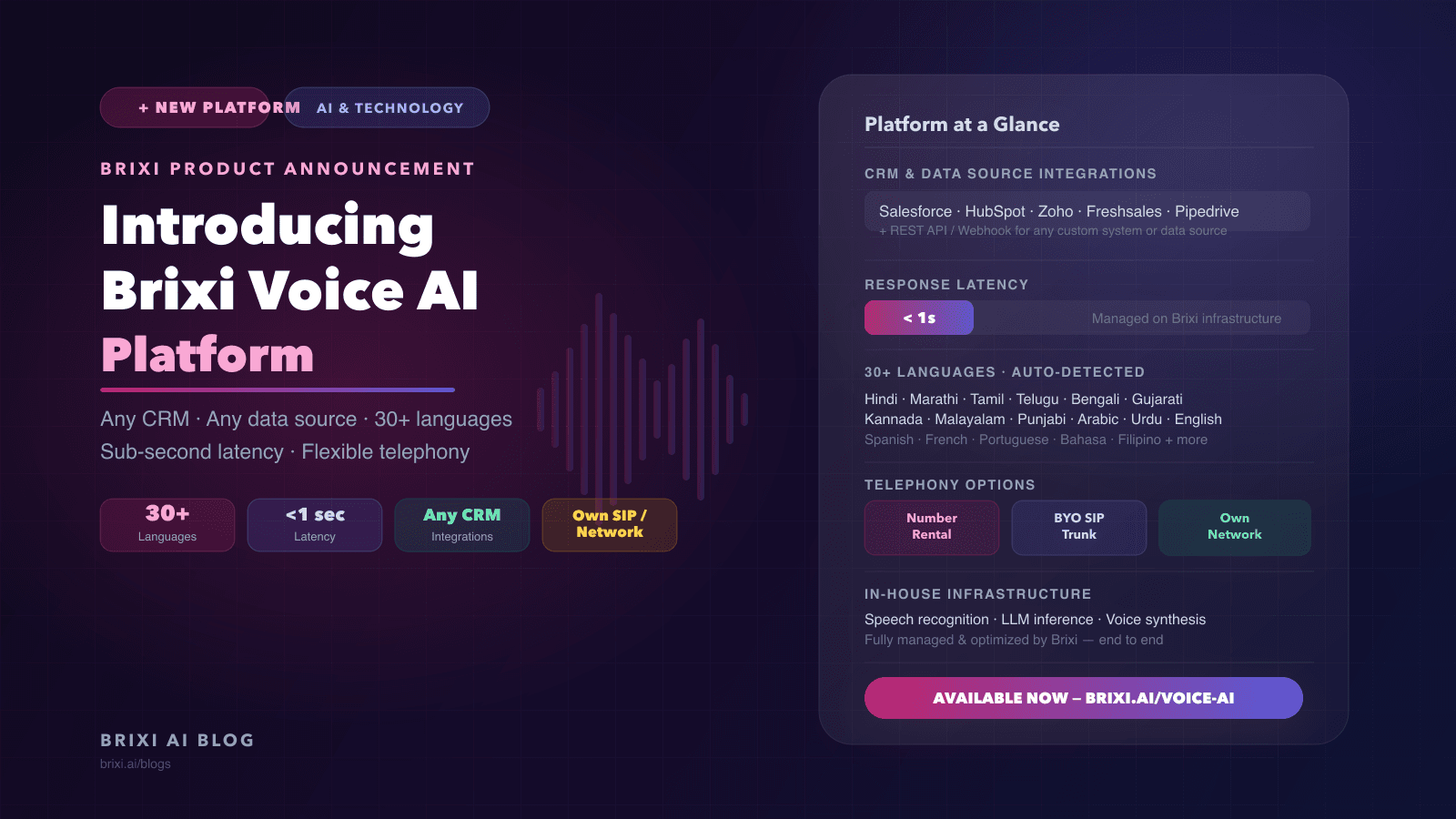
Most voice AI products stop at the call. Brixi Voice AI Platform closes the loop: it dials thousands of leads in parallel, qualifies them in 30+ languages with sub-second latency, and writes outcomes back to your CRM in real time. Here is what that looks like in practice.
Vivek runs a mid-size real estate sales operation in Coimbatore. On a Friday afternoon in March, his team received 1,400 new inquiries from a property portal campaign. By Monday morning, his six calling agents had reached 280 of them. The other 1,120 were sitting in a spreadsheet, cooling off.
The bottleneck was not effort. His reps were dialing steadily. The bottleneck was a structural mismatch: one conversation at a time, in a world where lead intent decays by the hour. The reps spent as much time on disconnected calls and cold leads as they did on genuinely interested buyers.
That is the problem the Brixi Voice AI Platform is built to solve. Not just calling at scale, but qualifying at scale, in real time, in the language the lead picks up in, with every outcome landing back in the CRM before the next rep picks up the phone.
What is the Qualification Feedback Loop and why do most voice tools break it?
Most outbound voice tools are dialers. They move a call from queued to connected. What happens on the call, and what happens to that information afterward, is left to the rep or to a separate integration layer. This creates a gap that quietly kills ROI.
We call this structural problem the Qualification Feedback Loop. A lead enters the system. An AI agent calls, qualifies, and captures intent signals. Those signals update the lead record immediately. The next human action, whether a rep callback or a follow-up message, is informed by what the AI learned. Without that loop closed, the AI call is marketing research that no one reads.
The contrarian claim worth stating plainly: a voice AI that does not write back to your CRM in real time is worse than a well-trained rep with a notepad, because it creates the illusion of automation while leaving the hardest part, the data handoff, as a manual step. The Brixi platform is architected around closing the Qualification Feedback Loop by default.
Does connecting your CRM have to be complicated?
The platform is built to work with your existing lead data, not replace it. Lead records flow in from wherever they already live, and every call outcome, qualification status, intent score, and follow-up flag, writes back the moment the call ends.
- Native integrations with Salesforce, HubSpot, Zoho, Freshsales, Pipedrive, and Brixi CRM.
- REST API and webhook support for any system without a native connector.
- CSV ingestion for teams running campaigns from manual lead lists.
- Real-time two-way sync: qualification data and call outcomes update your CRM as each call ends.
- Multi-source campaigns: pull from multiple CRMs or data sources into a single campaign.
- Field mapping: configure your schema once and the platform handles it on every call.
The named anti-pattern here is the "export and re-import" workflow, where call outcomes are batch-uploaded back to the CRM at end of day. By then, a rep who calls a qualified lead is often working with information that is hours old. The Brixi platform writes back per call, not per batch.
How does parallel campaign dialing actually work at high volume?
A campaign on the Brixi Voice AI Platform runs as a parallel operation, not a sequential queue. The platform dials across your lead list simultaneously, each connected call running a full AI conversation, with outcomes captured and written back in real time.
- Parallel dialing across large lead lists from a single campaign, no sequential queuing.
- Campaign scheduler: configure start time, calling hours, time zone rules, and retry logic.
- DND compliance checks before every dial, configurable per market.
- Smart retry logic for unanswered calls with configurable intervals and attempt limits.
- Live campaign dashboard: calls placed, connected, qualified, and outcomes updated in real time.
- Segment campaigns by lead score, source, geography, or any CRM field.
- Intent-based escalation: leads that cross your qualification threshold during a call are routed to a human rep while the campaign continues running.
For a team like Vivek’s, this means a 1,400-lead list is not a multi-day project. It is a campaign that runs in a defined window, surfaces the 200 or 300 leads worth a rep’s time, and lets the rep spend their day on conversations that are already warm.
Why does language detection matter more than language coverage?
The common pitch for multilingual voice AI is a list of supported languages. The harder engineering problem is what happens at the start of a call, when neither the platform nor the lead has declared a language preference. In a market like India, a lead from Tamil Nadu may pick up speaking Tamil, switch to English mid-sentence, or ask their question in a mix of both.
The Brixi platform identifies the language within the first few words of a call and responds accordingly, no menus, no re-prompting. The agent follows mid-call language switching without interruption. Coverage includes Indian regional languages, Gulf Arabic, Southeast Asian languages, and major European languages.
- Indian regional languages: Hindi, Marathi, Tamil, Telugu, Bengali, Gujarati, Kannada, Malayalam, Punjabi, Odia.
- Middle East: Arabic (Gulf, Levantine, Egyptian dialects), Urdu.
- International: English with multiple accent profiles, Spanish, French, Portuguese, Bahasa Indonesia, Filipino, and more.
- Automatic mid-call language switching follows the caller without restarting the conversation.
A named anti-pattern: configuring your campaign for a single language because it is the majority language in your lead list. In deployments we see, 15 to 25 percent of leads in a mixed-region campaign prefer to speak in a regional language even when they can manage English. Forcing them into English produces shorter calls and lower qualification rates.
What does sub-second latency mean for a real conversation?
Latency in a voice AI system is the time between when a caller finishes speaking and when the agent begins responding. At 2 to 3 seconds, most callers perceive the pause as a system error or a dropped connection. At 1 second, it reads as a slightly slow person. Under 1 second, the conversation feels natural.
The latency threshold that changes call quality
Under 1 second of end-to-end response latency: callers stay engaged and answer qualification questions. Above 2 seconds: callers start asking "hello?" and the qualification window closes before it opens. The Brixi platform is tuned to keep response latency under one second.
The full Voice AI stack, speech recognition, language model inference, voice synthesis, and call orchestration, runs on Brixi infrastructure. We control configuration, capacity, and performance tuning end-to-end. This matters because latency problems in a voice pipeline can originate at any layer, and diagnosing them across vendor boundaries is slow. With the full stack under one roof, we can identify and address issues without routing through multiple support channels.
What telephony options does the platform support?
Teams have different telephony setups and different constraints. Some are starting fresh. Others have existing carrier relationships, DID inventories, or contact center infrastructure they cannot abandon overnight. The platform supports three options.
Rent a number through Brixi
Rent local or national numbers through Brixi, available across several markets. Numbers show a local caller ID and work for both inbound and outbound campaigns. This is the fastest path to a first campaign if your team has no existing telephony infrastructure.
Bring your own SIP trunk
If your organization has an existing carrier relationship, connect your SIP trunk directly to the platform. Your carrier handles PSTN connectivity. Brixi handles the AI layer. You keep your existing DID inventory and carrier rates. For teams with negotiated per-minute rates, this option preserves those economics.
Integrate at the network level
For teams with existing telephony infrastructure, including PBX, UCaaS, or contact center systems, the platform integrates at the network level. Inbound calls route from your existing system into Brixi AI agents. Outbound campaigns run through your network fabric. This is the path for enterprise teams where replacing telephony infrastructure is not on the table.
What changes after a quarter of running the Qualification Feedback Loop?
The first visible change is rep utilization. When AI pre-qualification runs consistently, reps stop spending the first two minutes of every call establishing whether the lead is worth talking to. That time compounds quickly across a team of six or ten.
The second change is lead list quality over time. Because every call outcome writes back to the CRM, teams accumulate a real signal about which lead sources, which portal campaigns, which geographies, and which time windows produce leads that actually qualify. Most teams find this retroactively changes where they spend their marketing budget.
The third change is coverage. A team that can only reach 280 of 1,400 leads in a weekend is making a quality-versus-coverage tradeoff they did not choose deliberately. With parallel outbound voice AI handling initial qualification, the coverage constraint shifts. More leads get a first contact. Fewer go cold in the queue.
What does not change: the rep relationship. The Qualification Feedback Loop is designed to surface warm leads to reps, not to replace the rep conversation that closes a deal. The AI handles the volume work. The rep handles the high-intent conversation.
What teams use the platform for today
- Outbound lead qualification: call portal inquiries, qualify for budget and intent, route serious leads to reps immediately.
- Follow-up campaigns: re-engage leads that did not respond after initial contact, with outcomes written back to CRM.
- Project launch outreach: reach a pre-registered interest list at launch, segment by declared interest, and prioritize callbacks.
- Inbound handling: answer inbound calls 24/7 with a natural AI conversation that qualifies and routes.
- Post-visit follow-up: reach site visitors within hours of a property visit to capture feedback and confirm next steps.
- Re-engagement campaigns: reach dormant leads from existing databases that have not been worked in months.
- Lending and financial services: qualify leads on loan type, ticket size, and urgency before routing to relationship managers.
The deeper bet: why Vivek’s problem is not a staffing problem
Vivek did not have a staffing problem on that Monday morning. He had six competent reps and a clear process. What he had was a volume problem that the staffing model cannot solve economically. Hiring a seventh rep does not get him to 1,400 contacts over a weekend. Neither does a twelfth.
The deeper bet the Brixi Voice AI Platform makes is that outbound lead qualification is a data processing problem that has been incorrectly categorized as a people problem. The people problem is the high-intent follow-up conversation, the one where a rep who understands the buyer’s situation and the project’s specifics can actually move someone toward a decision. That is where human judgment and relationship matter.
Initial qualification, by contrast, is structured, repeatable, and high-volume. It maps cleanly to what AI voice agents do well: consistent delivery, no fatigue, real-time data capture, and the ability to run in parallel at any scale. When those two jobs are separated clearly, both the AI layer and the human layer perform better.
Vivek ran his first campaign on the platform in April. His reps now start the week with a shortlist of leads that have already answered the baseline questions. The 1,400 leads get first contact the same day. The rep conversation starts at a different point in the qualification arc.
Ready to close your Qualification Feedback Loop?
Connect your CRM, configure your first campaign, and run your first AI voice calls. 30+ languages, sub-second latency, and the telephony setup that fits your team.
Book a DemoFrequently Asked Questions
The platform has native integrations with Salesforce, HubSpot, Zoho, Freshsales, Pipedrive, and Brixi CRM. For other systems, a REST API and webhook layer supports any custom CRM or internal database. CSV ingestion is available for manual lead lists. Every call outcome writes back to your CRM in real time as each call ends, not in batch uploads.
The platform supports 30+ languages including Hindi, Marathi, Tamil, Telugu, Bengali, Gujarati, Kannada, Malayalam, Punjabi, Odia, Arabic in multiple dialects, Urdu, English with multiple accent profiles, Spanish, French, Portuguese, Bahasa Indonesia, Filipino, and more. Language detection is automatic: the agent identifies the language within the first few words of the call and follows mid-call language switching without re-prompting.
Sub-second latency means the AI agent begins responding within under one second of the caller finishing speaking. In a qualification conversation, pauses longer than 1 to 2 seconds cause callers to interpret the system as broken or disconnected. This shortens calls and reduces qualification rates. The Brixi platform is tuned to keep end-to-end response latency under one second, which keeps the conversation rhythm natural and qualification conversations complete.
Yes. The platform supports three telephony options: renting numbers through Brixi, connecting your own SIP trunk to preserve your existing carrier relationship and DID inventory, or integrating at the network level with your existing PBX or contact center infrastructure. These options can be mixed across different campaigns if your team has varied telephony setups.